Work from 2001 to 2018 · Part 5 of 12
Media Foundry: Did the Spot Actually Air?
Media Foundry checked purchased TV spots against ad-watermark detections, block by block, with a drag-to-fix grid for the leftovers.
On this page
Buying a television spot and having it actually air are two different events, and PrecisionDemand’s whole pitch (tell an advertiser what market their ad dollars would convert into real sales) falls apart if the second event doesn’t happen. Early in my PrecisionDemand years, before the Audience Planner took over my time, I built the tool that checked whether it had: Media Foundry.
The problem: proof, not just a plan#
A media plan is a promise: this spot, on this station, in this week. Whether the station kept that promise is a separate question, and the only way to answer it is to watch television and see what actually ran. Media Foundry didn’t do that watching itself. We paid outside companies to watch for an ad watermark embedded in the spot, all over the country, and report back every time and place they saw it. Media Foundry’s job was to take that stream of detections and reconcile it against the plan.
Reading the grid#
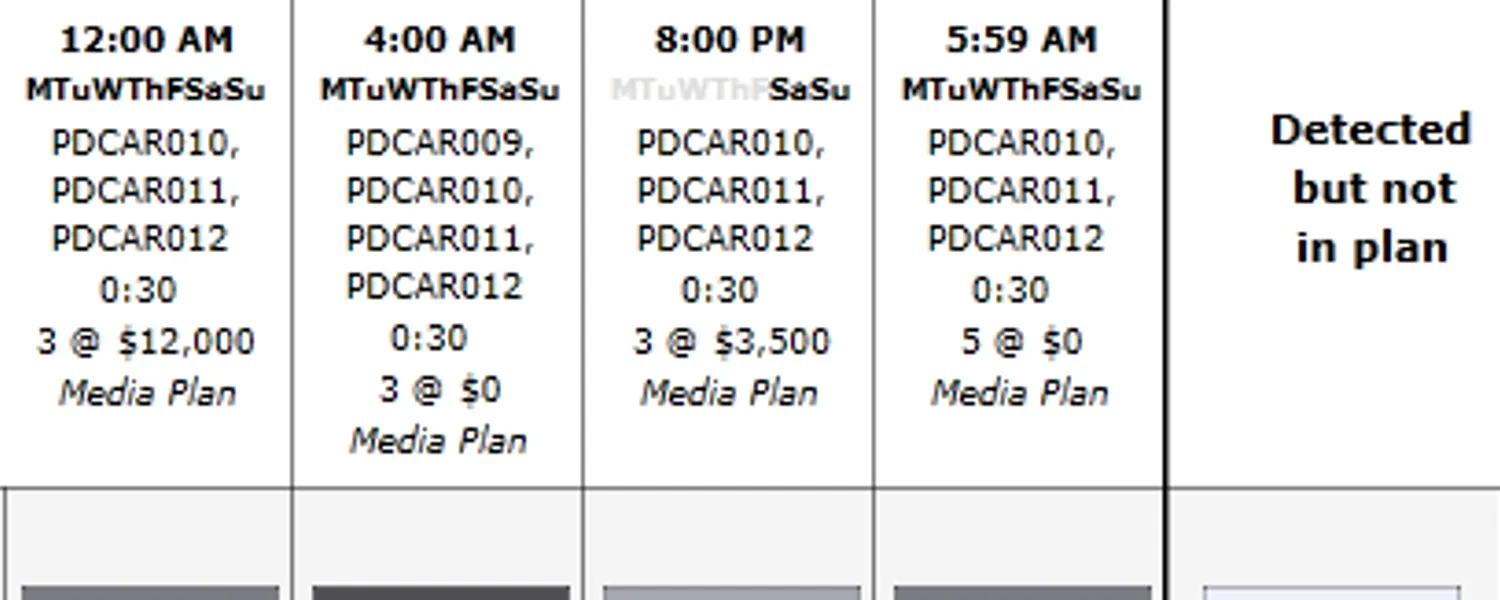
The one screenshot that survives from Media Foundry is a single week of a Carfax campaign, national, on A&E, for a run of :30 spots. It’s dense, so here’s how to read it.
Each column is a planned spot block: a time window, the days of the week it runs, and how many spots the plan called for and at what price. Each row is a detection: a timestamp and a spot ID that some outside spotter’s watermark scan caught airing. The circles between them mark, block by block, whether that detection lines up with a block in the plan. The far right column, “Detected but not in plan,” catches everything that aired without a plan to explain it.
Reconciling plan against reality#
Strip away the grid chrome and three things can happen to any given block or detection: a detection matches a planned block, a planned block never gets a matching detection, or a detection shows up with nowhere in the plan to put it.
That third case, a detection with nowhere to go, is where the grid stopped being read-only. Drag a row out of “Detected but not in plan” and drop it onto a block, and Media Foundry created a new airing record on the spot: a way to correct the reconciliation by hand instead of leaving a mismatch sitting on the report. It’s a small feature, but it’s the one that turns the grid from a status display into a tool someone actually used to close out a week.
One week at a time#
Reconciliation tools aren’t glamorous; they exist because a claim (“your ad ran”) is worth nothing without a way to check it, week after week, campaign after campaign. This was PrecisionDemand’s way of checking, and one of the first screens I built there.