Work from 2001 to 2018 · Part 6 of 12
Audience Planner: 2,473 TV Shows on One Screen
The Silverlight side project that became PrecisionDemand's flagship: explore thousands of TV programs by targeting quality, then optimize the buy.
On this page
I joined PrecisionDemand in March 2010 as the sole user interface developer, and I was still the sole user interface developer when AOL bought us in May 2014. Four years, one frontend person. Every screen a customer or a salesperson or an analyst ever looked at was mine, the design decisions as well as the code.
The Audience Planner is the one I’d show you first. It started as a 20% time idea, it became the company’s flagship product, and it’s one of the three things in the portfolio I froze in 2018 that I’m proudest of. It’s also completely dead: it was a Silverlight application, and no browser has run Silverlight for years. What survives is a folder of screenshots and a walkthrough video.
What PrecisionDemand sold#
TV ad-spend optimization. The pitch: we could tell you, for every market, what your TV ad dollars would convert into real sales.
That’s a harder claim than it sounds. Television inventory is sold on audience size: a rating, a CPM, how many eyeballs. The thing an advertiser actually cares about is whether the people watching are the people who might buy a mid-size SUV. Our whole business was the gap between those two things, and the Audience Planner was the interface where a buyer got to see the gap and act on it.
What it Does#
Explore, filter, optimize, export. You open every program we had data on as one visual collection, you narrow it with facets until you’re looking at the inventory you care about, you hand the survivors to the optimizer, and you leave with a spreadsheet.
What made it work was that it all lived in one window, over the same collection, with the counts and the averages updating in the status bar as you went. You never left to run a report.
Explore: a card for every program#
Here is the entry view. Each program in the catalogue is a card, and the cards are stacked into a histogram binned by targeting score.
The status bar along the bottom is the part I still like best.
Program Count: 2473. Average Impressions: 241,772. Average Cost: $1,022.77. Average CPM: $4.23. Average tCPM: $112.12.
Whatever you’d filtered down to, those five numbers described it, and they moved the instant you touched anything. It’s the cheapest possible feedback loop and it did more work than any chart on the screen.
The left panel is the facet list: a search box, then the targeting score with a two-handle range
slider over its own miniature distribution, then three score clusters, then impressions per airing, targeted
impressions per airing, cost per airing, CPM, tCPM, and, further down the scroll, media market,
network, genre, conversions, cost per acquisition, primary daypart and primary day of week. The
breadcrumb at the top left says tRatio: Over -0.4, which is the filter that produced this view.
The toolbar has two dropdowns that I think are the most important controls in the product: Sort and Color. Both are set to the targeting score here, a stat of ours that measured how well a program’s audience matched the audience the advertiser was paying to reach, and a number doing three jobs at once in this view: it bins the histogram, it sorts the cards, and it colours them on a red-through-yellow-to-green ramp. You can point either dropdown at any field independently, which means the same collection can be arranged by cost and shaded by targeting quality, or the reverse, and the answer to “am I overpaying for the wrong audience” falls out of the picture rather than out of a calculation.
The t prefix elsewhere in the UI means “targeted”: you get CPM and tCPM as a pair, and
Imps per Air and tImps per Air as a pair. A program with a good CPM and a terrible tCPM is
cheap for a general audience and expensive for yours. Most of the product is about noticing that.
Filter: the treemap#
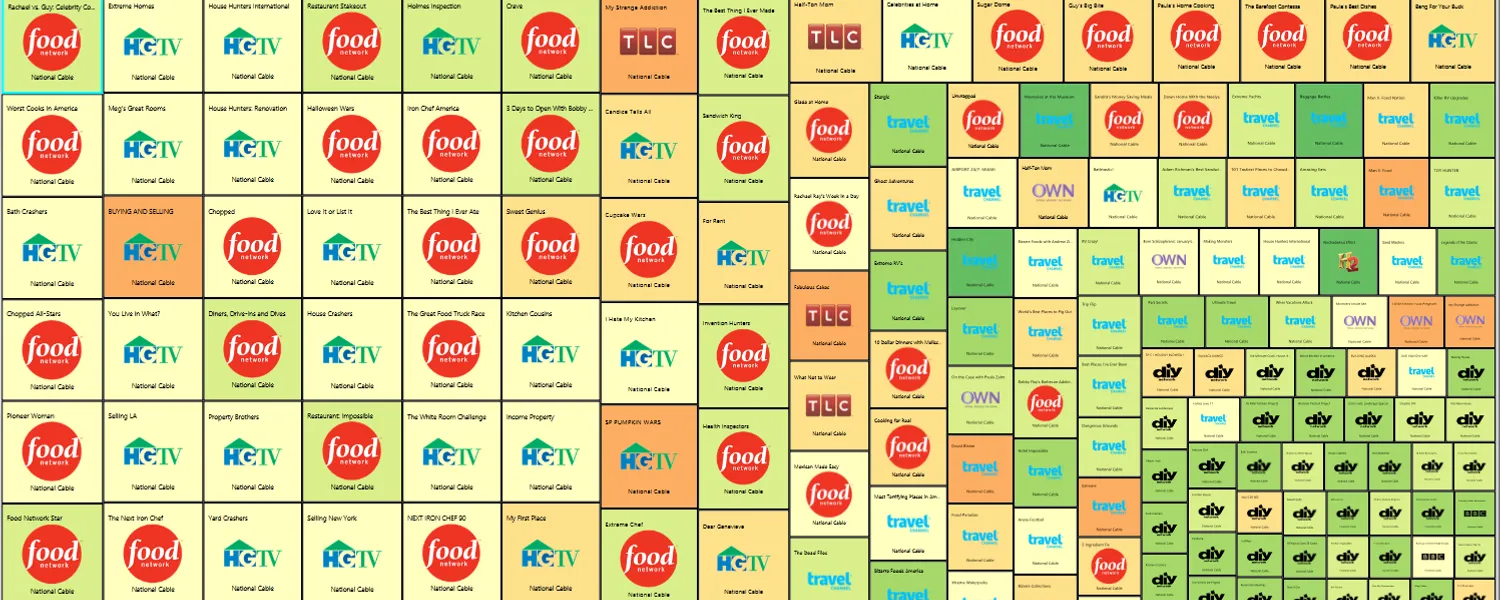
Tick one box in the Genre facet and the collection redraws. This is the view I’d put on a poster.
Every tile is a program, sized by whatever the sort dropdown is pointed at (impressions per airing,
here), coloured by targeting score, with its network’s logo drawn on it. The genre facet on the left is showing its counts (762 documentary, 191
instructions and advice, 149 general drama, 95 feature film, 62 news, 55 popular music, 45 situation
comedy, 31 sports) and INSTRUCTIONS, ADVICE is the one that’s ticked, so the status bar now
reads 191 programs at an average of $1,632.80 an airing.
The logos were a deliberate choice and I’d make it again. A buyer doesn’t think in program identifiers; they think “the Food Network block is cheap and the Travel Channel block is orange”. Putting the brand mark on the tile turned a data structure into something a media planner could read across a conference table. Sort by impressions per airing, as it is here, and the big recognisable names sort themselves to the top left without anyone explaining the layout.
One card, opened up#
Zoom into a single tile and it becomes a card with its own metrics, plus a detail panel. This is a third session, back on the card grid rather than the treemap, with 2,328 programs in scope, so don’t try to reconcile its numbers with the two screenshots above.
Three things worth pointing at here.
The four metrics on the card each carry a tiny bar showing where that value sits in the whole distribution. tCPM $48.02 is meaningless on its own; tCPM $48.02 with a marker near the good end of the range is a decision. That pattern (never show a number without showing its context) is the one idea on this screen that hasn’t dated at all.
The Airings block lists a maximum weekly airing count and then a row per campaign, four vehicle
names and one called PrecisionDemand Optimal. That last row is the tell: the app isn’t only
describing the inventory, it’s holding our own recommended plan alongside whatever the client is
actually running, ready to be compared.
The Demographics block is a list of household attributes (year the home was built, gender,
income, marital status, and, my favourite, Golf - True), each with a small diverging bar showing
whether this program’s audience over- or under-indexes on it.
Optimize: “Re-calculate Optimal Plan”#
The other end of the product is a grid, and it’s deliberately boring.
The interesting thing about this screenshot is how much of it is zero. Of the twenty-eight rows visible, six have a non-zero optimal airing count. Property Virgins, NY Ink, How I Met Your Mother, Mutant Planet, My First Place: nothing. The plan puts fifty airings into The Tonight Show, eighteen into House, forty-one into Cubs Baseball, fifty into Say Yes to the Dress, eighteen into So You Think You Can Dance and twenty-six into 60 Minutes. An optimizer that concentrates is doing its job; an optimizer that spreads a little money over everything is just computing an average. Watching most of the grid stay at zero was how you knew the run had actually solved something.
A checkbox next to an editable airing count, on a screen whose main verb is “re-calculate”, is there so a buyer can pin the lines they’ve already committed to and let the solver move everything else around them.
Export, and the comparison charts#
Lastly there is a button labelled Export to Excel.
Nobody bought a media plan out of a Silverlight window. They bought it out of a spreadsheet that went to their agency, got argued over, and came back with changes. The most sophisticated part of the product handed off to the least sophisticated format available, on purpose, because that’s where the work continued. A visualization tool without an escape hatch is a tool that asks people to do their real work somewhere it can’t see.
With the spreadsheet there was a comparison view.
The headlines are written as comparisons rather than values: “Airings will be 417 % more than Client”, “Targeted CPM will be 99 % less than Client”, “Targeted impression will be 6,966 % more than Client”. A buyer doesn’t need to know the targeted CPM. They need to know whether it’s better than what they’re doing now.
Why Silverlight, and what is left of it#
Because the company started at the dawn of Silverlight. That’s the whole answer. In 2010 it was a credible bet: you got a real widget toolkit, real data binding, a real type system and a control that already did faceted card browsing, at a time when doing any of that in a browser meant writing it yourself. We pivoted away when TypeScript hit the web: once the browser had a real type system of its own, the last argument for the plug-in was gone. Not on a particular Tuesday when someone slammed a door, just steadily, the way a platform stops being a decision and starts being a liability.
What happened to it#
AOL acquired PrecisionDemand in May 2014, and the quality of the platform was a key factor in that decision. The Audience Planner was the piece of the platform people meant.
Then I killed it. On the other side of the acquisition I led the migration off Silverlight and onto AngularJS, which is to say rebuilding my own flagship in a technology that could survive. The rewrite was the right call, and the treemap was still better than anything that replaced it for years.
What I would keep#
The technology is a museum piece and I wouldn’t defend a single line of it. Four decisions I’d port straight into anything I build tomorrow:
- A status bar that never lies. Five aggregates over the current filter, updating live. Cheaper than any dashboard and more trusted than all of them.
- Sort and colour as independent, user-chosen dimensions. Two dropdowns turned one view into every view.
- Never a number without its distribution. The little bar next to $48.02 is what made the $48.02 actionable.
- An export button. The tool isn’t where the decision gets made. Let the work leave.
And the thing that’s really worth saying: none of this was assigned. It was a 20% time project that turned into the flagship. I’ve gone on to build a great deal of software that somebody asked for, and the ones I’d show you first are still the ones nobody did.