Work from 2001 to 2018 · Part 7 of 12
Drag the Timeline, Refilter the Page
In 2013 I replaced our off-the-shelf Google charts with hand-built D3 dashboards where dragging the timeline refilters the whole page.
On this page
In 2013 I was the only UI developer at PrecisionDemand, a TV ad-tech startup, which meant every
chart our customers looked at was a chart I had put there. Most of them were not mine. They were
Google’s, loaded off google.com/jsapi, configured with a few lines and shipped. That year I spent
my 20% time replacing them with D3 charts I wrote myself, and the folder of demos that came out of
that is still sitting in the portfolio I froze in 2018.
This is the post about that swap: what the off-the-shelf chart did, what I built to replace it, and the one interaction, dragging a window across a timeline and watching an entire page of charts recompute, that turned out to matter far more than the charts did.
The chart I was replacing#
<script type="text/javascript" src="http://www.google.com/jsapi"></script>
<script type="text/javascript">
  google.load("visualization", "1", { packages: ["annotatedtimeline"] });
  google.setOnLoadCallback(drawChart);
</script>
Under that, a couple of thousand hardcoded data.addRows([...]) lines: a date, two values, and
annotation text per row. A number our own modelling produced was being drawn by a component I
didn’t write and couldn’t change.
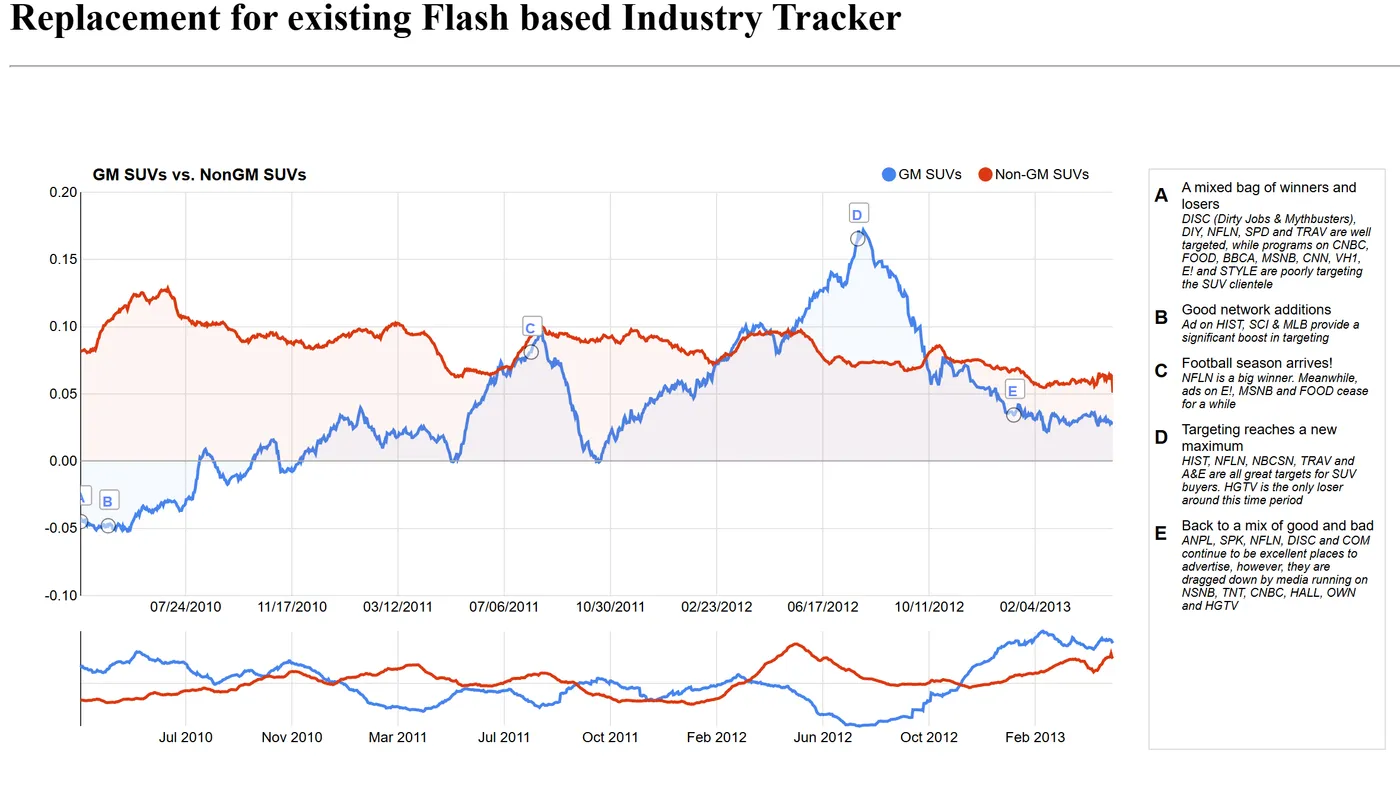
It’s a good chart. Two series, lettered annotations pinned to dates with a panel explaining them, zoom presets, and a range selector along the bottom. In 2013 Google drew all of that with a Flash object, which is the detail that explains the headline on the page I replaced it with: “Replacement for existing Flash based Industry Tracker”. The Flash in that sentence was Google’s, not ours.
Building the equivalent#
I don’t remember whether this won any argument internally. What I have is the files, and they’re clear about the intent: a copy of Google’s chart with the ceiling taken off, not a chart merely inspired by it.
The replacement chart is nv.models.PdLineWithFocusChart, 795 lines registered straight into NVD3’s
model namespace. Pd for PrecisionDemand. Two siblings sit next to it, PdBubbleMap and
PdHeatMap. And the data file it eats gives the game away:
{
  "date": 1270105200000,
  "value": -0.044918704,
  "label": "A",
  "description": "A mixed bag of winners and losers",
  "notes": "DISC (Dirty Jobs & Mythbusters), DIY, NFLN, SPD and TRAV are well targeted, ..."
}
A label, a headline and a body per point. The label is new: Google auto-lettered its own markers,
there was no column for it. The other two are a rename of Google’s pair: description is Google’s
title column, and notes is Google’s text column, which the Ford data mostly left unused. The series
colours are pinned in the same
file to #4684EE and #DC3912, the same blue and the same red the Google chart drew. Someone
opening the new page wasn’t supposed to notice a new chart library, just that it did more.
 Load the real 2013 tracker (about 300 KB of data)Hide the demo
The zoom presets are gone, replaced by a full-width strip of the same two lines underneath the main chart. You drag a window across that strip and the chart above it becomes that window. It’s a smaller idea than “1h 1d 5d 1w 1m 3m 6m 1y max” and a much better one, because the window is continuous and you can slide it rather than pick it off a menu. The annotations stay pinned to their dates while the window closes around them:
The sweep#
Here is the interaction the whole thing was really about.
Crossfilter holds one flat table in memory (for the rotations page, one row per TV rotation buy) and
lets you declare dimensions over it: purchase date, network, commission rate, creative length,
geography. Every chart on the page is a group over one of those dimensions. Filter any dimension and
every other group recomputes, incrementally, fast enough that you can do it inside a mousemove.
So the timeline strip is not a zoom control. It is a filter, and dragging it refilters the page.
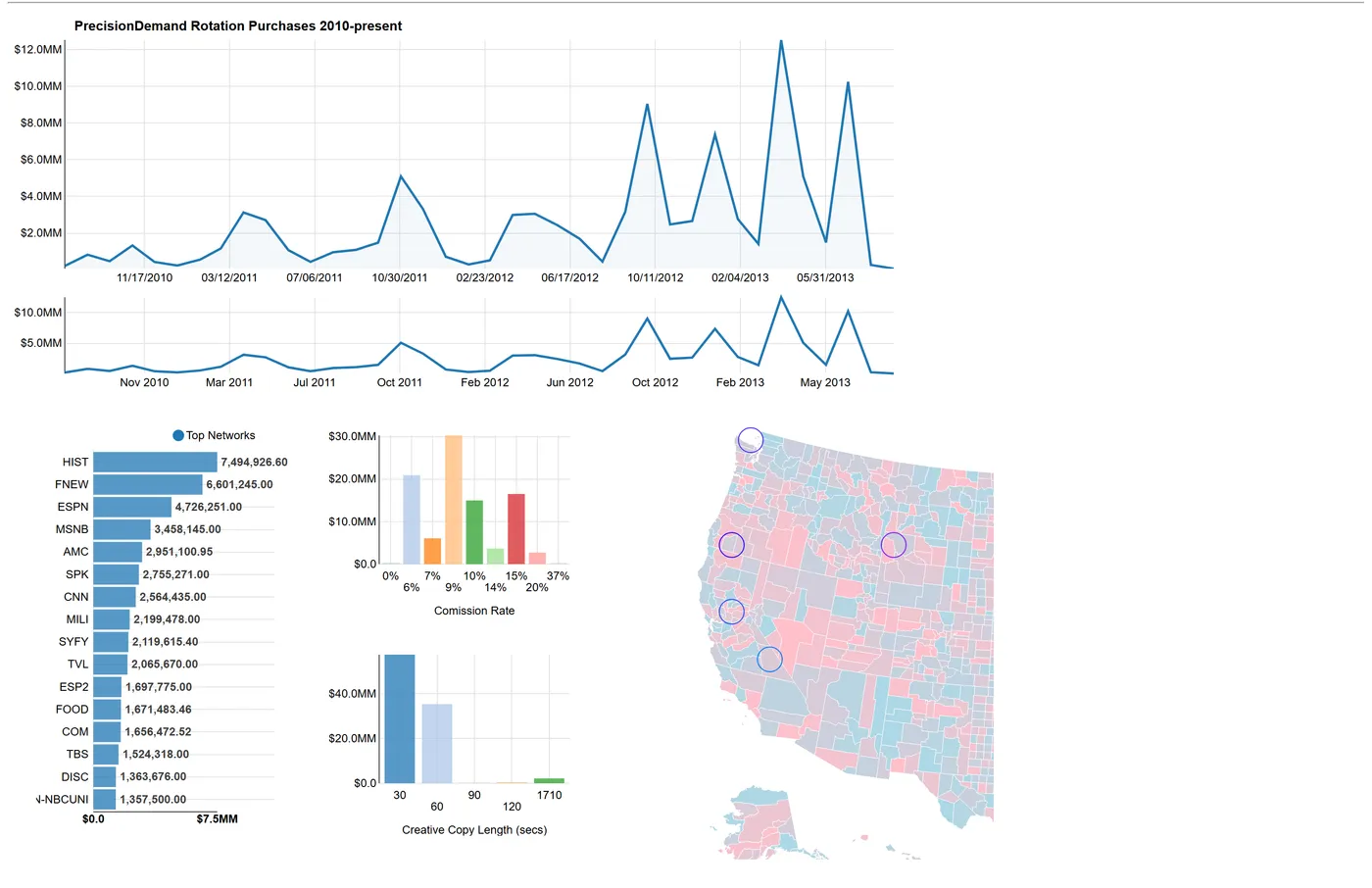
Drag across the lower strip; the count above the charts is crossfilter doing set intersection under your cursor:
 Load the real 2013 demo (about 2 MB of data)Hide the demo
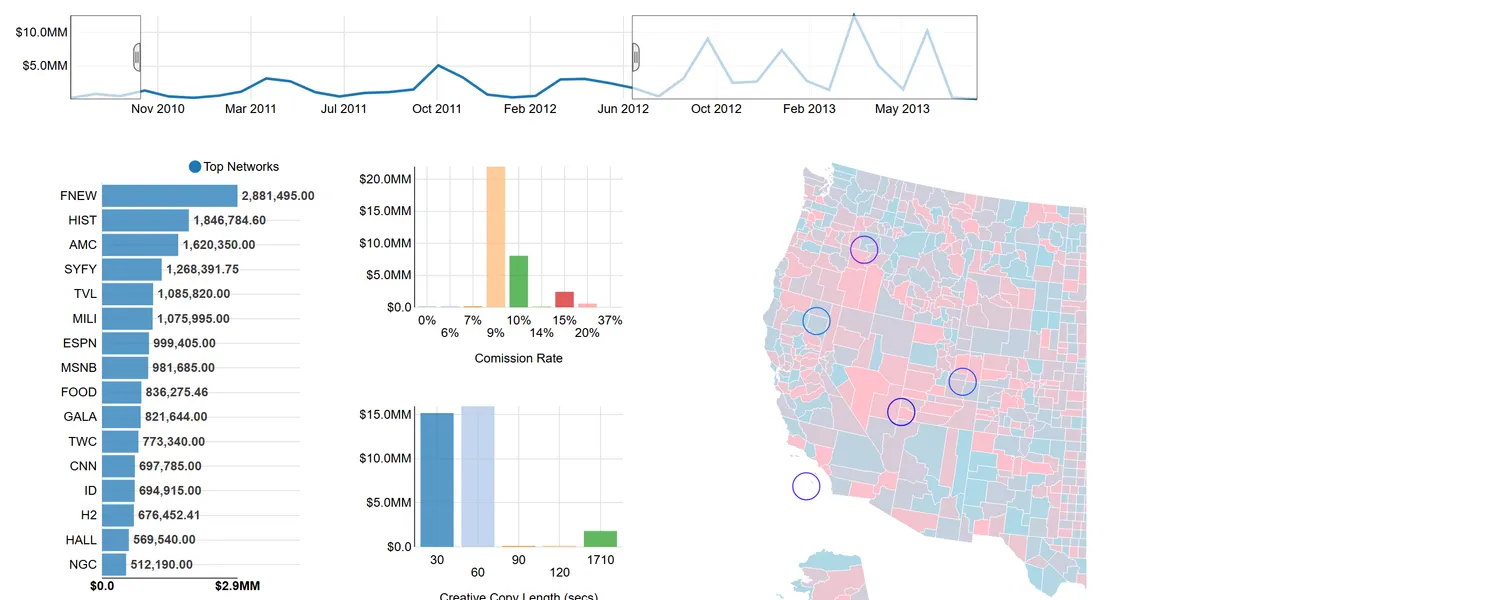
Nothing on that page is a page load. The network ranking reorders, the commission-rate histogram collapses onto two bars and spreads back out, the creative-length split flips between 30-second and 60-second spots, and the circles on the county map move, all of it while the mouse button is still down.
The tracker gets the same treatment: its strip is the same kind of filter, which is why sweeping it rescales the chart instead of zooming a picture.
The demo set#
The tracker and the rotations page were two pages of five. demos/d3Demo holds industryTracker, rotationExample,
programExample, explorerExample and webSpike, plus two hub pages. The hubs are the part I had
forgotten and now like the most. demos.html is six escalating throwaways (hover, animation on
click, more advanced animation, charting, animated charts, thousands of animated points), the
sketchbook of somebody learning a library in public.
The stack under the demos was D3 v3 with NVD3 for the chart models, Square’s crossfilter for the filtering, dc.js on the explorer page, and topojson for the maps. The three pages not already embedded above are preserved here too:
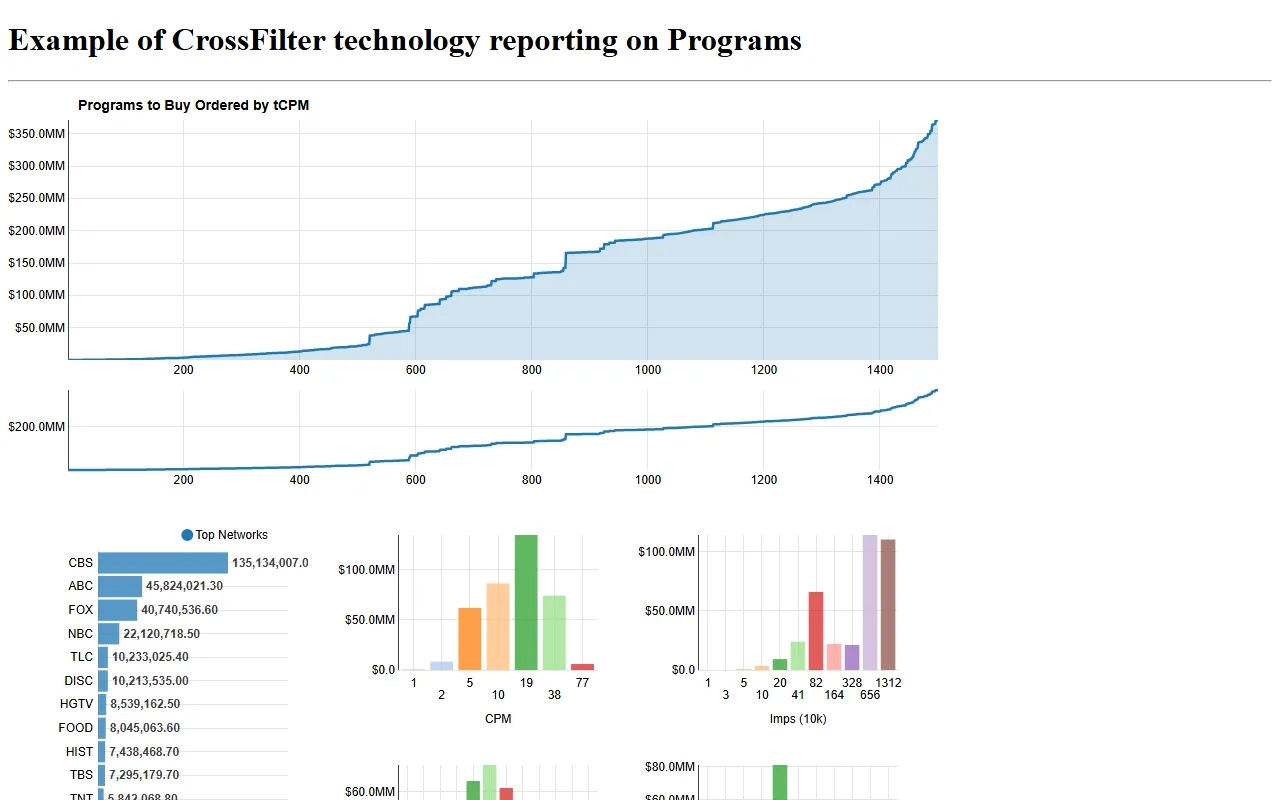 Load the real 2013 Programs demo (about 1 MB of data)Hide the demo
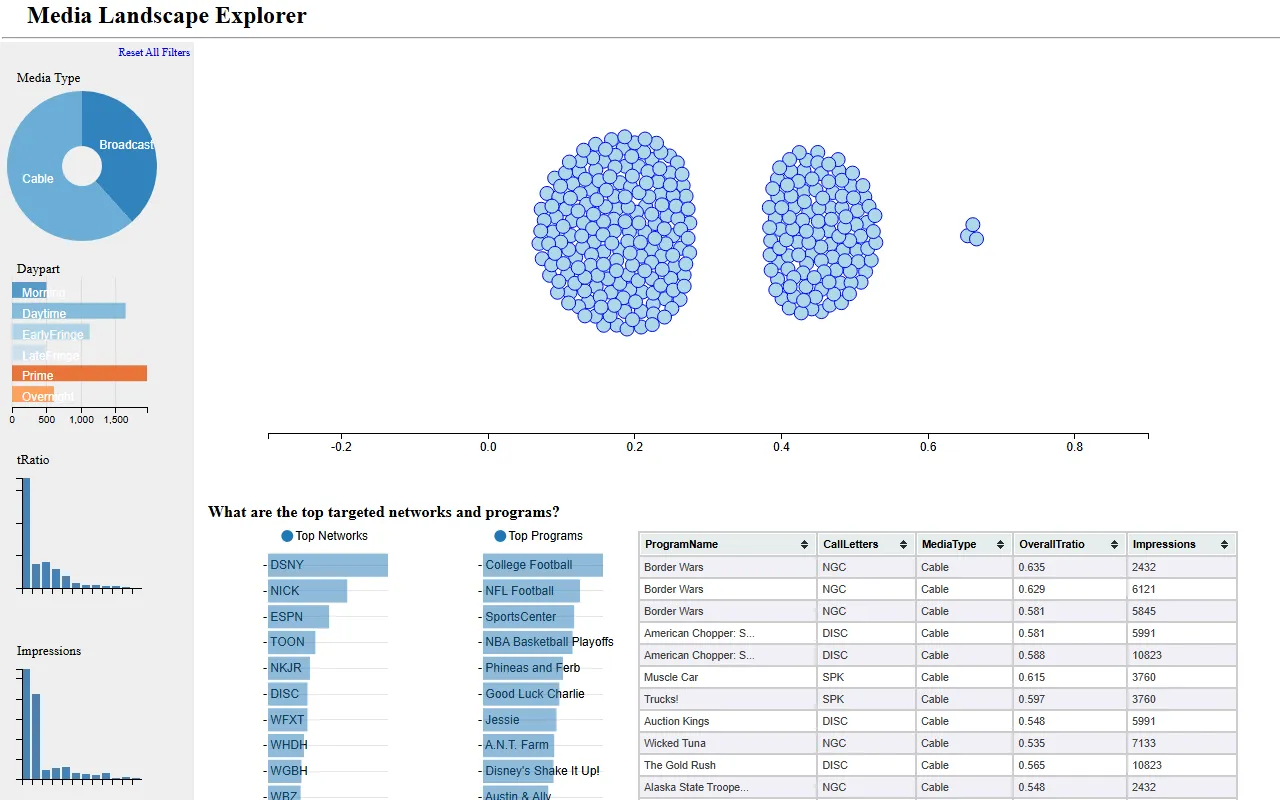 Load the real 2013 Explorer demo (about 3.5 MB of data)Hide the demo
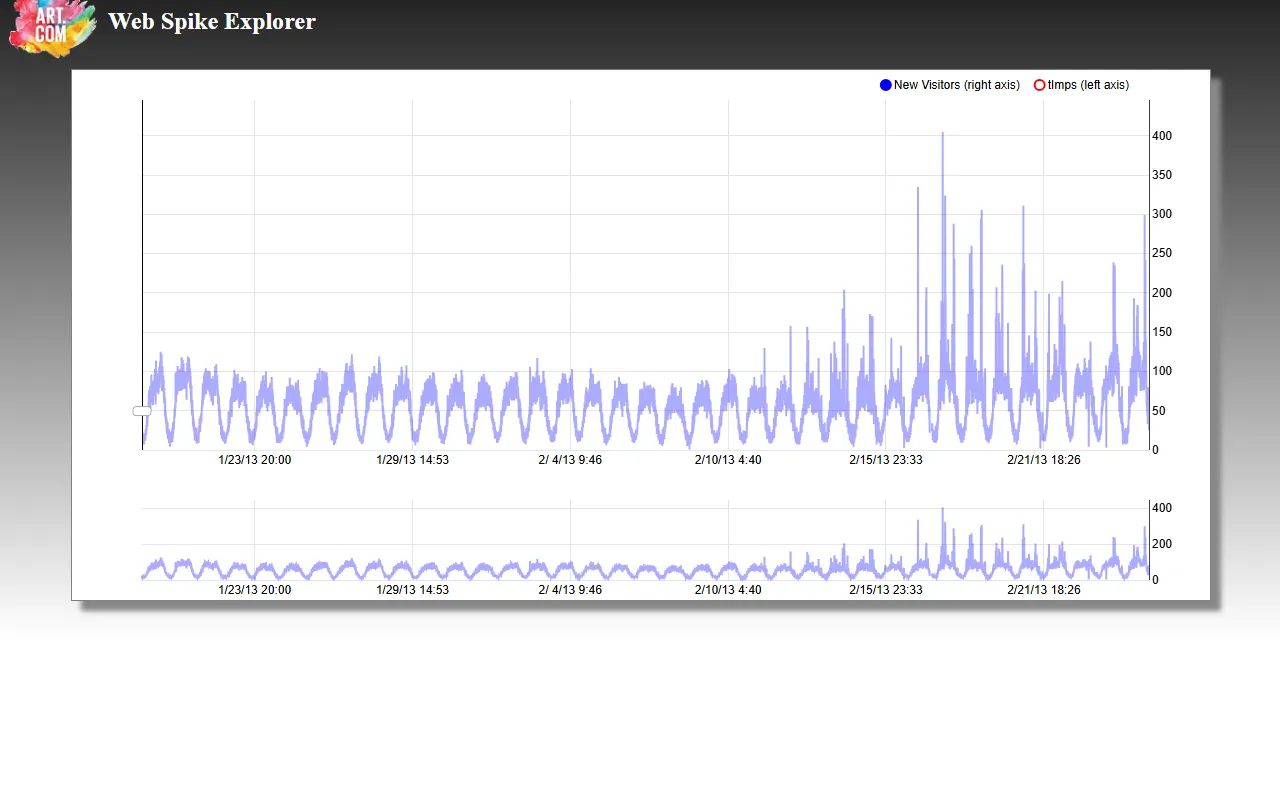 Load the real 2013 Web Spike demo (about 1.5 MB of data)Hide the demo
One file, crossfilterChart.js, opens with a comment I’m still glad I wrote:
// A direct copy from the crossfilter example:
// https://github.com/square/crossfilter/blob/50227903a5567d24c0d38141a5e94b5dec932b4c/index.html
Attribution, pinned to an exact commit, in the file itself. Thirteen years later it’s the only reason I can tell you with certainty where Square’s example ended and my code began.
What it turned into#
The charts themselves didn’t survive. D3 v3, NVD3 and a hand-rolled nv.models.Pd... aren’t how I’d
draw this today, and the pages that used them were rewritten more than once after AOL acquired
us in May 2014 and I moved the product off Silverlight and onto AngularJS.
The interaction survived. When I ask myself which of these side projects went anywhere, the list is the Audience Planner, DocMapper, sell-side targeting, and then, oddly for a list of products, “using crossfilter and dc.js for highly interactive charting”. The technique itself became flagship. The industry-ratings and sell-side dashboards that real customers used were built on this exact model: click anything to filter everything, drag the timeline to refilter live. Those are their own posts.
How it holds up in 2026#
It runs. npx http-server . -p 8123 -c-1, open /demos/d3Demo/rotationExample.html, and the sweep
above is what you get. Those frames are from this month, not from 2013. The caveats are the ones you’d
expect of a thirteen-year-old page:
- D3 and topojson load from
http://d3js.org, so the demos work over a localhttpserver and would break as mixed content on anyhttpsrehost. - The sweep works; some of the other interactions are flaky now, and I’ve left them that way.
The Google chart still renders too, which I didn’t expect. But it renders because Google kept maintaining it and silently swapped its guts out from under my page. Mine renders because, once it was written, it never needed anything from anyone.