Work from 2001 to 2018 · Part 11 of 12
ONE TV: One Design Language, Three Generations
AOL's ONE TV had an upfront half and a scatter half, and behind both a constraints dialog I had first drawn in Balsamiq in 2012.
On this page
AOL bought PrecisionDemand in May 2014, and I spent the four years after that on one product. First as the senior engineer leading the migration off Silverlight and onto AngularJS, then, from June 2016, as a Principal running a UI team of three and owning everything a user saw on the Linear TV advertising platform. The platform was called ONE TV.
Upfront: a quarter, planned all at once#
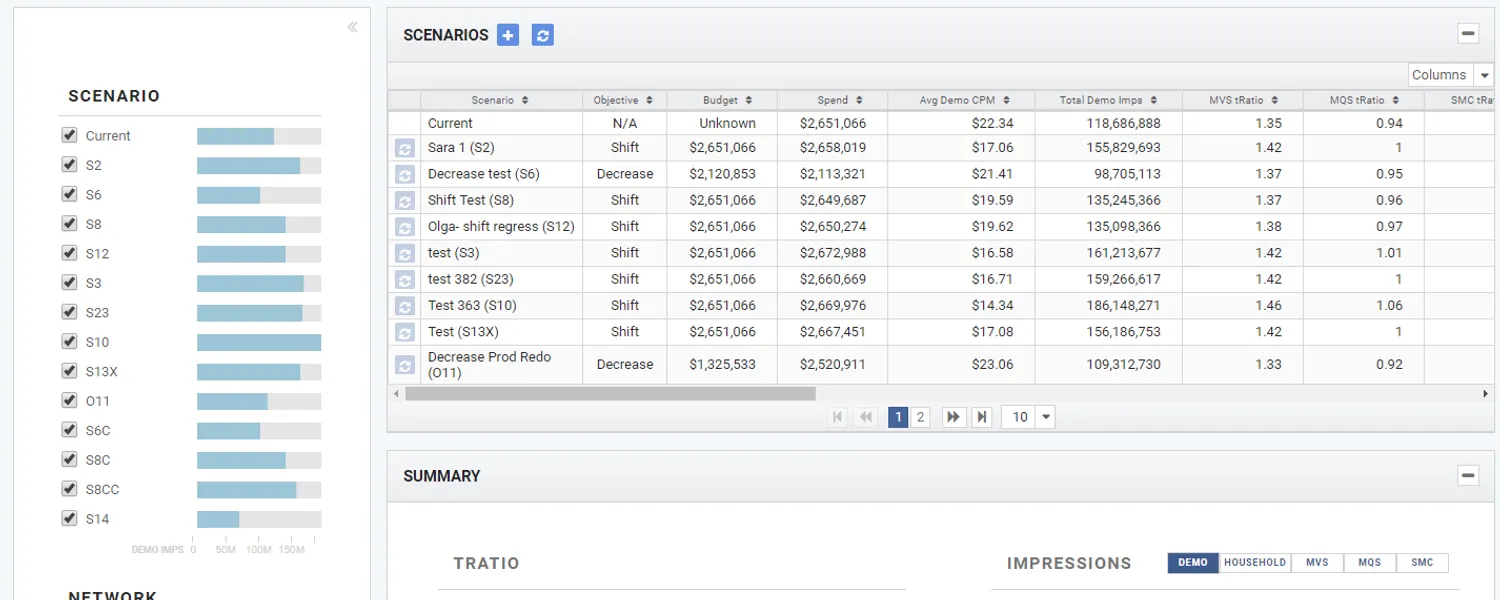
The shipped upfront screen is a scenario comparison. You pick a campaign, a date range, a network group and a demographic, and then you make as many plans as you like against that one budget and put them side by side.
Each scenario runs the optimizer with a different objective (shift the buy, decrease the budget), and the grid ranks the results by what they cost and how well they hit the target. By 2018 there were three scoring columns on that grid, MVS, MQS and SMC, three ways of scoring the same plan. I couldn’t tell you today what all three of those initialisms stood for.
Scatter: the tactical half#
Scatter is the other half of the year. The upfront market sells a quarter or a season in advance; scatter is the tactical buying that happens inside the quarter, once budgets have moved and there’s inventory left over to place against.
A tactic group inside a campaign, a budget of $390,000, a forecast of $387,003 against it, and a headline targeting score of 1.26. Underneath, the plan broken out by network with a score each: USA at 1.13, Oxygen at 1.86, E! at 1.38, Bravo at 1.21, and CNBC and NBC both down at 0.58. It’s a ranking of two completely different pieces of inventory on how efficiently they reach the people you’re paying to reach.
The same dialog, three generations deep#
Balsamiq first, then code. That was how I worked at PrecisionDemand and it was still how I worked at AOL: draw the whole screen, annotate the behaviour on it in callouts, argue about the drawing, then build the drawing.
The callouts are the specification. “Creating a scenario automatically adds a new column to the grid below (and a new series in all charting).” “All charts show ALL scenarios AND all update on every change.” “Ready to print for sending to network”, because the end of all this optimizing was a piece of paper that told a network which spots to buy and which to sell back.
The wireframe is a Q3 campaign against FOX Networks Group at $1.25M, 21% of the total. The shipped screen is a Q2 campaign against Univision at $2.65M. Different quarter, different networks, same screen.
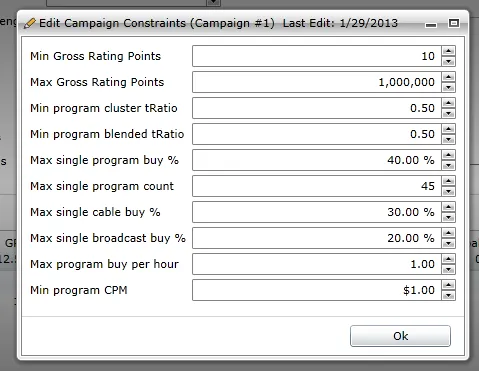
Here is what it looked like a year later, after it had been built as a Silverlight dialog, in the product, with a real edit timestamp on it:
And here is the Scenario Editor from the ONE TV upfront wireframe above, four years after that, at a different company, on a different frontend stack, after an acquisition: the same list of fields, in the same order, with the same default values.
| Field | 2012 wireframe | 2013 Silverlight | 2017 wireframe |
|---|---|---|---|
| Min program / airing cluster score | 0.30 | 0.50 | 0.30 |
| Min program / airing blended score | 0.20 | 0.50 | 0.20 |
| Max single program / airing buy % | 0.05 | 40.00 % | 0.05 |
| Max single program / airing count | 50 | 45 | 50 |
| Min program / airing CPM | 3.00 | $1.00 | 3.00 |
Minimum cluster score, minimum blended score, maximum single buy percentage, maximum single count, minimum CPM per unit. Five years, one rename: what had been a program became an airing, which is a more precise word for the same thing. The numbers in the boxes did move: the 2013 build shipped stricter score floors than the drawing asked for and a far looser cap on any single buy, which is what happens when a design meets real inventory. But the fields, and their order, are the fields.
I don’t think anyone decided this. Nobody wrote down a design language and made us follow it. The vocabulary was useful enough that every rewrite kept it rather than paying to re-derive it, and by 2017 I was drawing wireframes against a list of constraints I’d first drawn in 2012, mostly out of muscle memory.
What happened to it#
AOL renamed the division Oath in June 2017: same team, same platform, a new logo on the same screens. I left in March 2018, and the reason these screenshots exist at all is that I was taking them on the way out, for a portfolio. ONE TV was shuttered after I left.
So the product is gone, and what survived it is a directory listing where a 2012 drawing, a 2013 dialog and a 2018 web app all sit next to each other, and you can’t tell from the field labels which is which.