Work from 2001 to 2018 · Part 10 of 12
One Codebase, Two Datasets
I built a crossfilter dashboard for the fatalencounters.org data, then forked the whole thing to chart who was rewarding who at work.
On this page
There are two projects in my 2018 portfolio snapshot that are the same application. One of them plots people killed during encounters with police. The other one plots who said thank you to whom at work. They share a build, a chart engine, a data model shape, and (still, in the copy I have) a package manifest.
This is the story of that pair: what the machine was, why pointing it at a second dataset took almost no code, and what that says about how I was building things around 2014.
Fatal Encounters#
Fatal Encounters is a personal project. It was never public, and the data in it is real: it comes from fatalencounters.org, a volunteer effort to build what the subtitle on my page called “an impartial, comprehensive and searchable national database of people killed during interactions with law enforcement.”
Each record is a person. The TypeScript interface I wrote for it has twenty-odd fields: name, age, gender, race, date, street address, city, state, county, the agency involved, cause of death, a short description, the disposition of the case, a link to the news story, latitude and longitude. I’m not going to quote a row here. The point is that the row exists, one per death, with a name on it, and that this is what “a dataset” looked like when I loaded it into a charting toolkit built for advertising metrics.
I no longer remember what prompted me to build it, and I didn’t put it anywhere anyone could see. What I can tell you is what I did with it: I gave the data the same treatment I gave everything else I was working on that year, which was to make every field filterable by clicking on it.
 Load the real 2014 demo (about 3 MB of data; its 2015-2021 update button fetches 12 MB more)Hide the demo
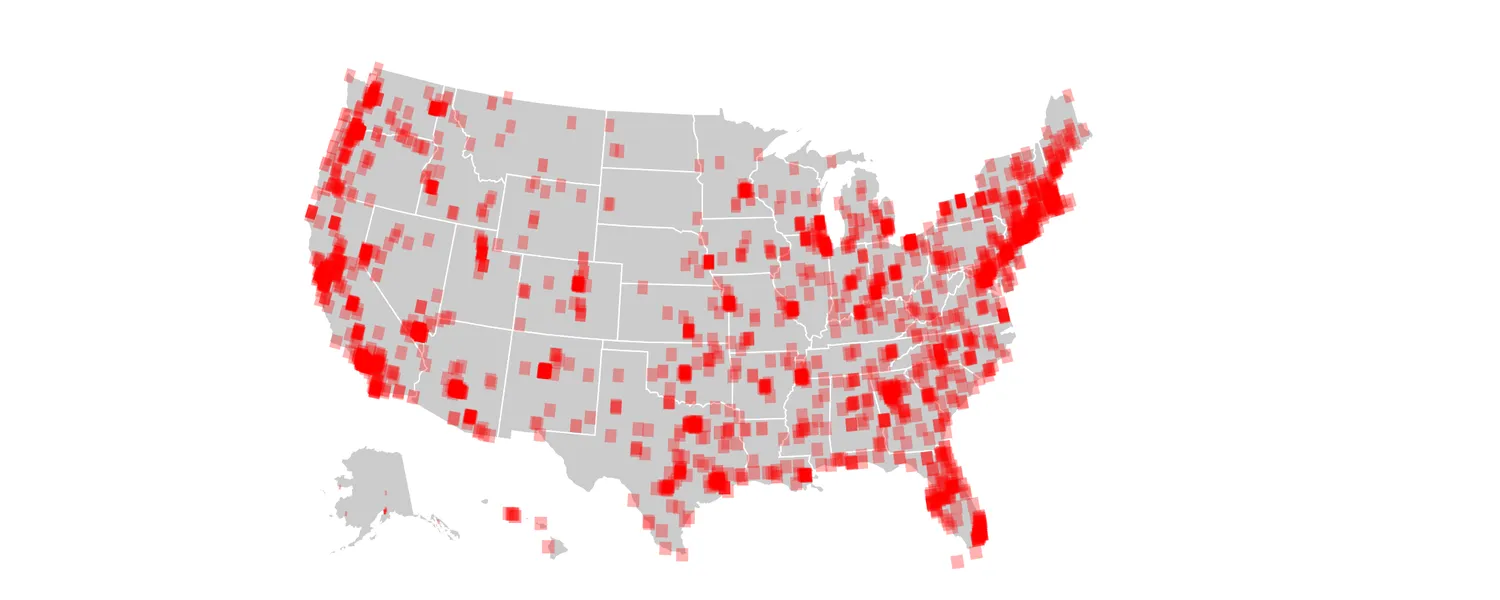
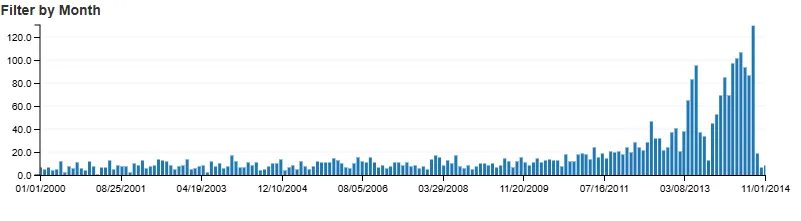
That sweep is the whole interaction model: the same crossfilter-under-dc.js machinery as the D3 demos, wrapped here in AngularJS 1.3 directives. Drag a window across the time axis and every other chart on the page (the map, the age histogram, the state ranking, cause of death) recomputes against the filtered set; click a bar in any of them and the rest refilter again, the timeline included.
Seven more years, one button#
The volunteers kept collecting long after my snapshot. The export I pulled while writing this post ends on December 31, 2021 and holds about 31,500 records, against the 3,209 baked into my 2014 copy. That made a natural experiment: could the preserved build absorb seven more years of data without touching it?
Click “Load the 2015-2021 update” inside the demo above and you are watching the answer. A small 2026 script appends 13,499 newer rows into the running crossfilter (starting from June 2014, because the last months of my snapshot were thin and needed back-filling), stretches the timeline’s axis to December 2021, and asks dc.js to redraw. Every chart recomputes and the dataset grows five-fold. Click the button again and the rows come back out, restoring the 2014 snapshot. Not one line of the 2014 application changed; the addendum is a page of glue that lives next to the preserved code.
The machine#
The stack, from bower.json and vendor/: AngularJS 1.3, dc.js by way of angular-dc, crossfilter, NVD3,
ui-grid, D3 3.4, jQuery 2.1, Bootstrap 3.2 and moment.js. The sources are TypeScript, compiled to
JavaScript with the .js.map files checked in next to them, which is a fair snapshot of what
“modern frontend” meant to me in 2014, and also why I can still read the intent of the code twelve
years later instead of squinting at compiler output.
The part I still like is that the charts are declared, not built. Each one is a typed config object in an array:
this.charts["ageBarFilter"] = <Charts.IFilterBarChart<Models.IEncounter>>{
    title: "Suspect Age",
    chartType: Charts.ChartType.filterBarChart,
    keyId: "age",
    metricIds: ["count"],
    sizeData: <Charts.ISizeData>{ width: thirdWidth, height: normalHeight, margin: baseMargin },
    groupCountOverride: 25,
    minX: 1,
    maxX: 97,
    elasticY: true,
    hideFilter: true
};
(“Suspect Age” is the 2014 title; the field is just Age.)
keyId names the dimension, chartType picks the renderer, sizeData places it. A directive walks
the array and instantiates the dc.js charts; the page itself contains almost no chart code. That
generic parameter is why the second project exists at all.
The fork#
The other one is the Adap.tv Rewards Report, and it charts the company’s peer-recognition program. Its subtitle is the whole spec: who is rewarding who, when, how much, and why.
 Load the real 2015 demo (about 2 MB of data, names replaced)Hide the demo
Structurally it’s the same page. Here are the chart slots each one defines, in source order:
Fatal Encounters
- Suspect Age
- Gender
- Race
- State
- Cause of Death
- Drug Use
- Map
- Filter by Month (brushable)
Rewards Report
- When (brushable)
- How Much
- LTV Internal
- Top Givers
- Top Rewarded
- Why
- All Givers
- All Rewarded
Different words, identical shapes: a brushable time dimension, a couple of numeric histograms, a pie, and a stack of ranked row charts. Here is the “How Much” histogram from the rewards config array, which is the age chart with the nouns swapped:
this.charts["amountBarFilter"] = <Charts.IFilterBarChart<Models.IReward>>{
    title: "How Much",
    chartType: Charts.ChartType.filterBarChart,
    keyId: "amount",
    metricIds: ["amount"],
    sizeData: <Charts.ISizeData>{ width: quarterWidth, height: shortHeight, margin: baseMargin },
    groupCountOverride: 20,
    elasticY: true,
    hideFilter: true,
    minX: 0,
    maxX: 101
};
Same interface, different generic: IEncounter became IReward, ages 1 to 97 became dollar
amounts 0 to 101, and the rest is field names. Forking meant writing a new loader, a new
key-metrics class and a new array of config objects like this one. The chart engine, the
crossfilter wiring, the layout directives and the build were untouched.
That’s the argument for declaring charts as data. Retargeting the dashboard was a data-modelling job, not a rewrite. I didn’t go near the rendering code.
The habit#
The through-line is not AngularJS, which I wouldn’t choose today, or dc.js, which I might. It is that I had built a way of asking questions of a table (sweep the timeline, click the bar, watch everything else move), and once you have that, every table you meet starts looking like a candidate. Ad impressions, then a civic dataset about people who died, then thank-you notes from coworkers.
Two of those three deserved the treatment. The police-encounters data deserved more than a folder on my hard drive, and didn’t get it.